背景
随着LLM(大语言模型)技术的不断成熟和应用场景的不断拓展,越来越多的企业开始将LLM技术纳入自己的产品和服务中。LLM在自然语言处理方面表现出令人印象深刻的能力。然而,其内部机制仍然不明确,这种缺乏透明度的做法给下游应用带来了不必要的风险,这也导致了LLM应用落地难等问题。因此,理解和解释这些模型对于阐明其行为、局限性和社会影响至关重要。 LLM可观测性能够为模型可解释性提供必要的数据支撑,对于研究人员和开发人员来说,LLM应用可观测,可以识别意外的偏见、风险和性能改进。
作为AI时代的编程语言,Python在近年来得到了广泛的应用。目前热门的LLM项目,如Langchain、Llama-index、Dify、PromptFlow、OpenAI、Dashscope等均使用Python语言进行开发。为增强对Python应用,特别是Python LLM应用的可观测性,阿里云推出了Python探针,旨在解决LLM应用落地难、难落地等问题。助力企业落地LLM。
本文将从阿里云Python探针的接入步骤、产品能力、兼容性等方面展开介绍。并提供一个简单的LLM应用例子,方便测试。
应用示例
为方便大家理解和感受Python探针的功能,本文构建了一个LLM应用的示例:
某公司升级了其产品,新增了智能问答功能。其基本架构图如下:

基本业务流程为用户向server端发起一个问答请求,server去调用chatbot获取回复结果,chatbot收到请求后进行RAG后回复。
为观测此LLM应用,该公司接入了阿里云Python探针。下文将介绍如何接入阿里云Python探针。
Python应用接入应用监控
以下为在ACK环境下Python探针的接入方式,其他接入方式见:https://help.aliyun.com/zh/arms/application-monitoring/user-guide/start-monitoring-python-applications/?spm=a2c4g.11186623.0.0.107a5cecel3Fu5
前提条件
- 创建Kubernetes集群。您可按需选择创建ACK专有集群、创建ACK托管集群或创建ACK Serverless集群。
- 创建命名空间,具体操作,请参见管理命名空间与配额。本文示例中的命名空间名称为arms-demo。
- 检查您的Python版本和框架版本。具体要求,请参见Python探针兼容性要求。
步骤一:安装ARMS应用监控组件
- 登录容器服务管理控制台。
- 在左侧导航栏单击集群,然后在集群列表页面单击目标集群名称。
- 在左侧导航栏选择运维管理 > 组件管理,然后在右上角通过关键字搜索ack-onepilot。
重要:请确保ack-onepilot的版本在3.2.4及以上。
- 在ack-onepilot卡片上单击安装。
说明:ack-onepilot组件默认支持1000个pod规模,集群pod每超过1000个,ack-onepilot资源对应的CPU请增加0.5核、内存请增加512 M。
- 在弹出的页面中可以配置相关的参数,建议使用默认值,单击确定。
说明:安装完成后,您可以在组件管理页面升级、配置或卸载ack-onepilot组件。
步骤二:修改Dockerfile
- 首先从pypi 仓库下载探针安装器
pip3 install aliyun-bootstrap- 使用aliyun-bootstrap安装探针
aliyun-bootstrap -a install- 使用阿里云python探针启动
aliyun-instrument python app.py- 构建镜像,具体的Dockerfile示例如下:
Dockerfile示例:
# 使用Python 3.10基础镜像FROM docker.m.daocloud.io/python:3.10# 设置工作目录WORKDIR /app# 复制requirements.txt文件到工作目录COPY requirements.txt .# 使用pip安装依赖RUN pip install --no-cache-dir -r requirements.txtCOPY ./app.py /app/app.py# 暴露容器的8000端口EXPOSE 8000CMD ["python","app.py"]
# 使用官方的Python 3.10基础镜像FROM docker.m.daocloud.io/python:3.10# 设置工作目录WORKDIR /app# 复制requirements.txt文件到工作目录COPY requirements.txt .# 使用pip安装依赖RUN pip install --no-cache-dir -r requirements.txt#########################安装aliyun python 探针###############################RUN pip3 install  aliyun-bootstrap  && aliyun-bootstrap -a install##########################################################COPY ./app.py /app/app.py# 暴露容器的8000端口EXPOSE 8000#########################################################CMD ["aliyun-instrument","python","app.py"]
[警告]必看- 有使用unicorn启动的应用推荐使用以下命令做替换:
例如:
unicorn -w 4 -b 0.0.0.0:8000 app:app更改为
gunicorn -w 4 -k uvicorn.workers.UvicornWorker -b 0.0.0.0:8000 app:app- 有使用gevent 协程的需要配置参数
程序中有使用
from gevent import monkey
monkey.patch_all()
需要设置环境变量GEVENT_ENABLE=true
GEVENT_ENABLE=true
步骤三:授予ARMS资源的访问权限
- 如果需监控ASK(容器服务Serverless版)或对接了ECI的集群应用,请在云资源访问授权页面完成授权,然后重启ack-onepilot组件下的所有Pod。
- 如果需监控ACK集群应用,但ACK集群中不存在ARMS Addon Token,请执行以下操作手动为集群授予ARMS资源的访问权限。如果已经存在ARMS Addon Token,请跳转至步骤四。
a. 登录容器服务管理控制台,在集群列表页面,单击目标集群名称进入集群详情页。
b. 在左侧导航栏选择配置管理 > 保密字典,然后在顶部选择命名空间为kube-system,查看addon.arms.token是否存在。
说明:集群存在ARMS Addon Token时,ARMS会进行免密授权。Kubernetes托管版集群默认存在ARMS Addon Token,但对于部分早期创建的Kubernetes托管版集群,可能会存在没有ARMS Addon Token的情况,因此,对于Kubernetes托管版集群,建议首先检查ARMS Addon Token是否存在。若不存在,需进行手动授权。
- 登录容器服务管理控制台。
- 在左侧导航栏选择集群,然后单击目标集群名称。
- 在目标集群的集群信息页面单击集群资源页签,然后单击Worker RAM角色右侧的链接。
- 在角色页面的权限管理页签上,单击新增授权。
- 选择权限为AliyunARMSFullAccess,然后单击确定。
- 如果需要监控专有版集群和注册集群应用,请确认对应的阿里云账号已包含AliyunARMSFullAccess和AliyunSTSAssumeRoleAccess权限。添加权限的操作,请参见为RAM用户授权。
安装ack-onepilot组件后,还需要在ack-onepilot中填写有ARMS权限的阿里云账号AK/SK。
- 在左侧导航栏选择应用 > Helm页面,单击ack-onepilot组件右侧的更新。
- 将accessKey和accessKeySecret替换为当前账号的AccessKey,然后单击确定。
说明: 获取AccessKey的操作,请参见创建AccessKey。
- 重启应用Deployment。
步骤四:为Python应用开启ARMS应用监控
- 在容器服务管理控制台左侧导航栏单击集群,在集群列表页面上的目标集群右侧操作列单击应用管理。
- 在无状态页面的目标应用右侧选择更多 > 查看Yaml。
如需创建一个新应用,单击右上角的使用YAML创建资源。
- 在YAML文件中将以下labels添加到spec.template.metadata层级下。
labels:
aliyun.com/app-language: python # Python应用必填,标明此应用是Python应用。
armsPilotAutoEnable: 'on'
armsPilotCreateAppName: "<your-deployment-name>" #应用在ARMS中的展示名称。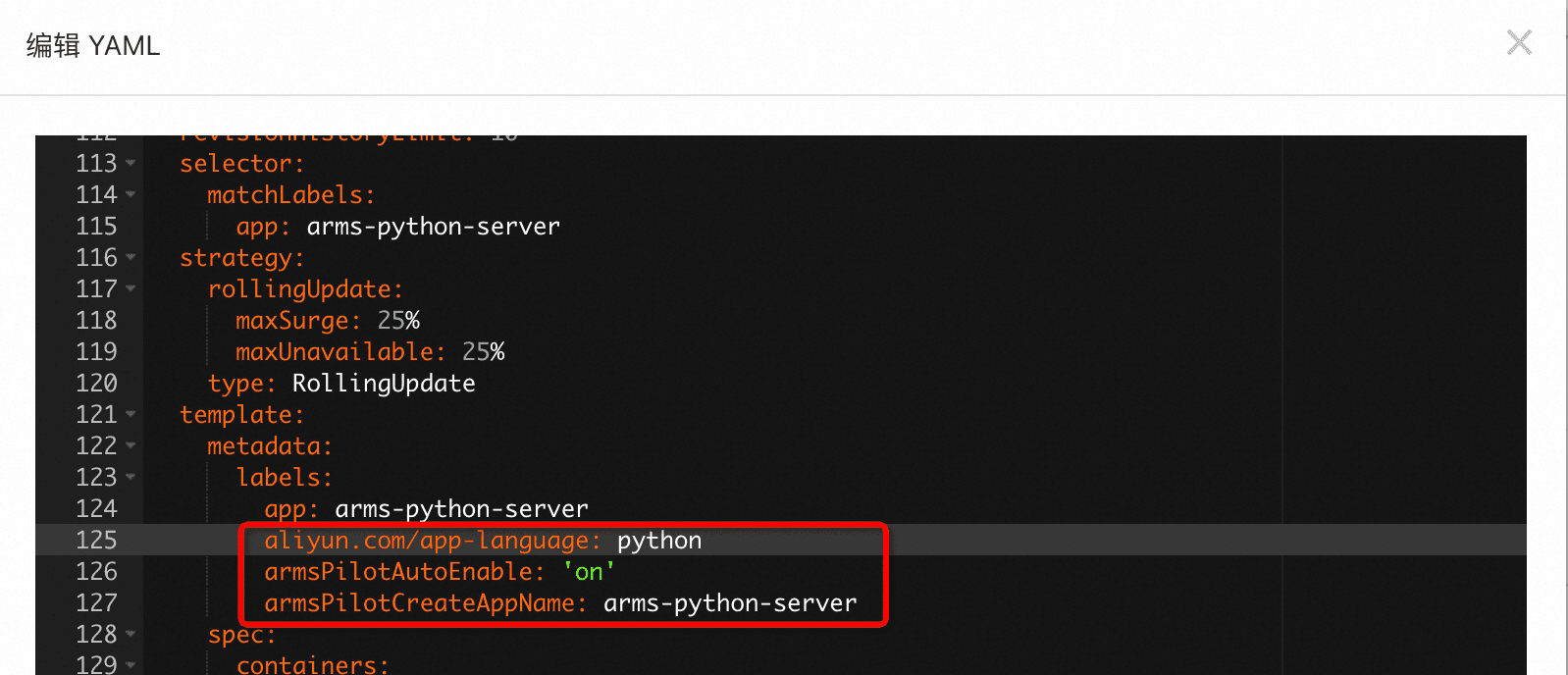
创建一个无状态(Deployment)应用并开启ARMS应用监控的完整YAML示例模板如下:
apiVersion: apps/v1
kind: Deployment
metadata:
labels:
app: arms-python-client
name: arms-python-client
namespace: arms-demo
spec:
progressDeadlineSeconds: 600
replicas: 1
revisionHistoryLimit: 10
selector:
matchLabels:
app: arms-python-client
strategy:
rollingUpdate:
maxSurge: 25%
maxUnavailable: 25%
type: RollingUpdate
template:
metadata:
labels:
app: arms-python-client
aliyun.com/app-language: python # Python应用必填,标明此应用是Python应用。
armsPilotAutoEnable: 'on'
armsPilotCreateAppName: "arms-python-client" #应用在ARMS中的展示名称。
spec:
containers:
- image: registry.cn-hangzhou.aliyuncs.com/arms-default/python-agent:arms-python-client
imagePullPolicy: Always
name: client
resources:
requests:
cpu: 250m
memory: 300Mi
terminationMessagePath: /dev/termination-log
terminationMessagePolicy: File
dnsPolicy: ClusterFirst
restartPolicy: Always
schedulerName: default-scheduler
securityContext: {}
terminationGracePeriodSeconds: 30

---

apiVersion: apps/v1
kind: Deployment
metadata:
labels:
app: arms-python-server
name: arms-python-server
namespace: arms-demo
spec:
progressDeadlineSeconds: 600
replicas: 1
revisionHistoryLimit: 10
selector:
matchLabels:
app: arms-python-server
strategy:
rollingUpdate:
maxSurge: 25%
maxUnavailable: 25%
type: RollingUpdate
template:
metadata:
labels:
app: arms-python-server
aliyun.com/app-language: python # Python应用必填,标明此应用是Python应用。
armsPilotAutoEnable: 'on'
armsPilotCreateAppName: "arms-python-server" #应用在ARMS中的展示名称。
spec:
containers:
- env:
- name: CLIENT_URL
value: 'http://arms-python-client-svc:8000'
- image: registry.cn-hangzhou.aliyuncs.com/arms-default/python-agent:arms-python-server
imagePullPolicy: Always
name: server
resources:
requests:
cpu: 250m
memory: 300Mi
terminationMessagePath: /dev/termination-log
terminationMessagePolicy: File
dnsPolicy: ClusterFirst
restartPolicy: Always
schedulerName: default-scheduler
securityContext: {}
terminationGracePeriodSeconds: 30

---

apiVersion: v1
kind: Service
metadata:
labels:
app: arms-python-server
name: arms-python-server-svc
namespace: arms-demo
spec:
internalTrafficPolicy: Cluster
ipFamilies:
- IPv4
ipFamilyPolicy: SingleStack
ports:
- name: http
port: 8000
protocol: TCP
targetPort: 8000
selector:
app: arms-python-server
sessionAffinity: None
type: ClusterIP

apiVersion: v1
kind: Service
metadata:
name: arms-python-client-svc
namespace: arms-demo
uid: 91f94804-594e-495b-9f57-9def1fdc7c1d
spec:
internalTrafficPolicy: Cluster
ipFamilies:
- IPv4
ipFamilyPolicy: SingleStack
ports:
- name: http
port: 8000
protocol: TCP
targetPort: 8000
selector:
app: arms-python-client
sessionAffinity: None
type: ClusterIP
执行结果
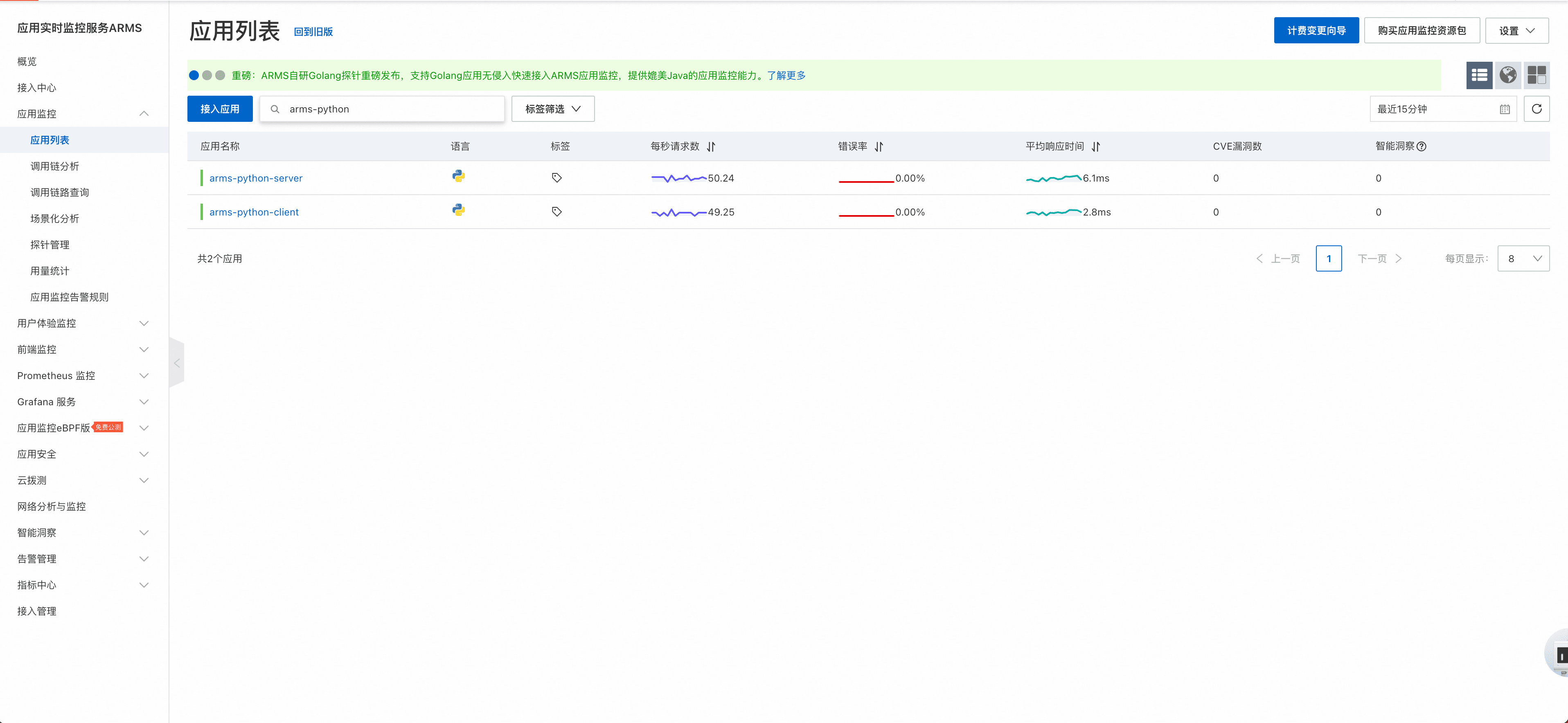
待容器完成自动重新部署后,等待1~2分钟,在ARMS控制台的应用监控 > 应用列表页面单击应用名称,查看应用的监控指标。更多信息,请参见查看监控详情(新版)。
产品能力
应用接入成功后,就可以通过https://arms.console.aliyun.com/#/tracing/list/cn-hangzhou来查看Python应用的信息了。以下是一些内容的展示:
调用链分析
- 微服务场景:
调用链分析功能可以通过自由组合筛选条件与聚合维度进行实时分析,并支持通过错/慢Trace分析功能,定位系统或应用产生错、慢调用的原因。
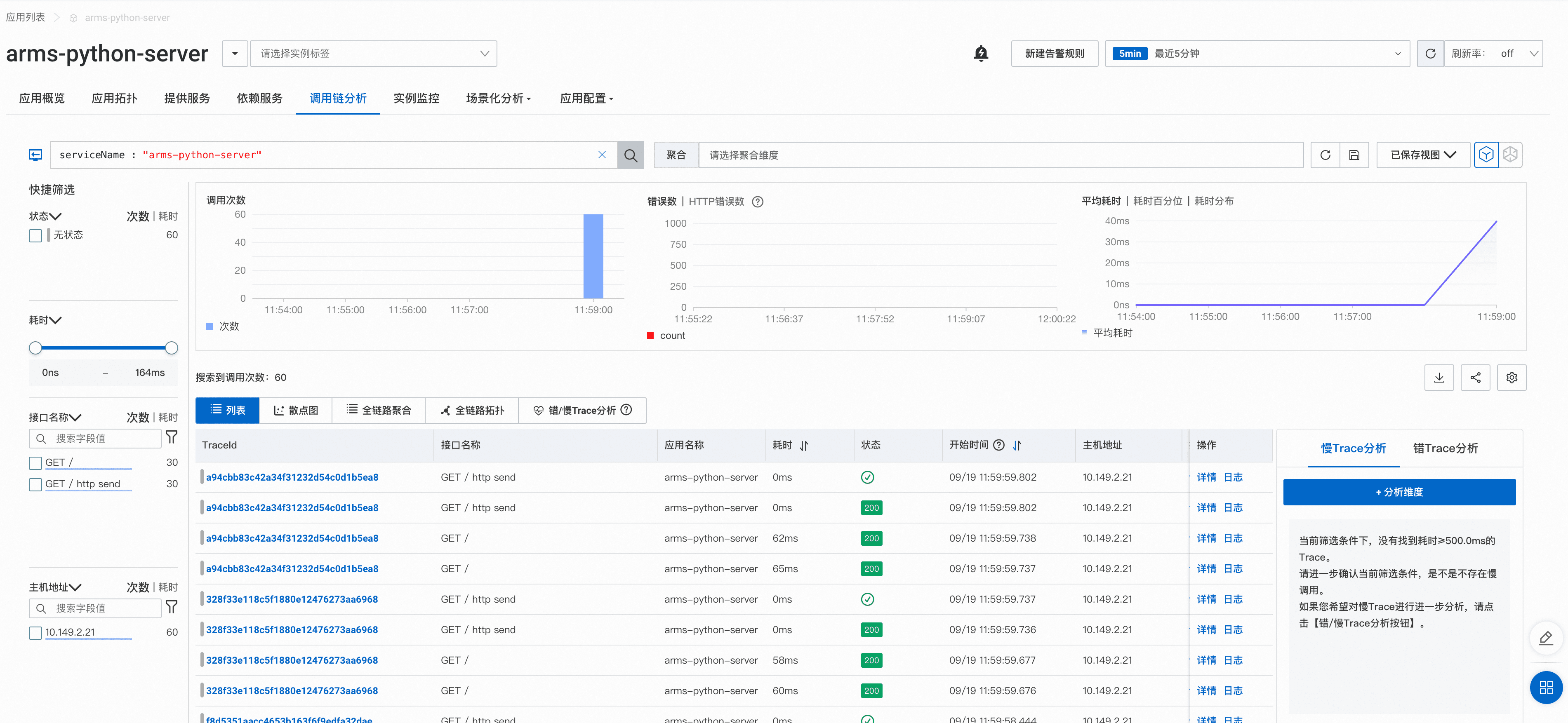
调用链详情:
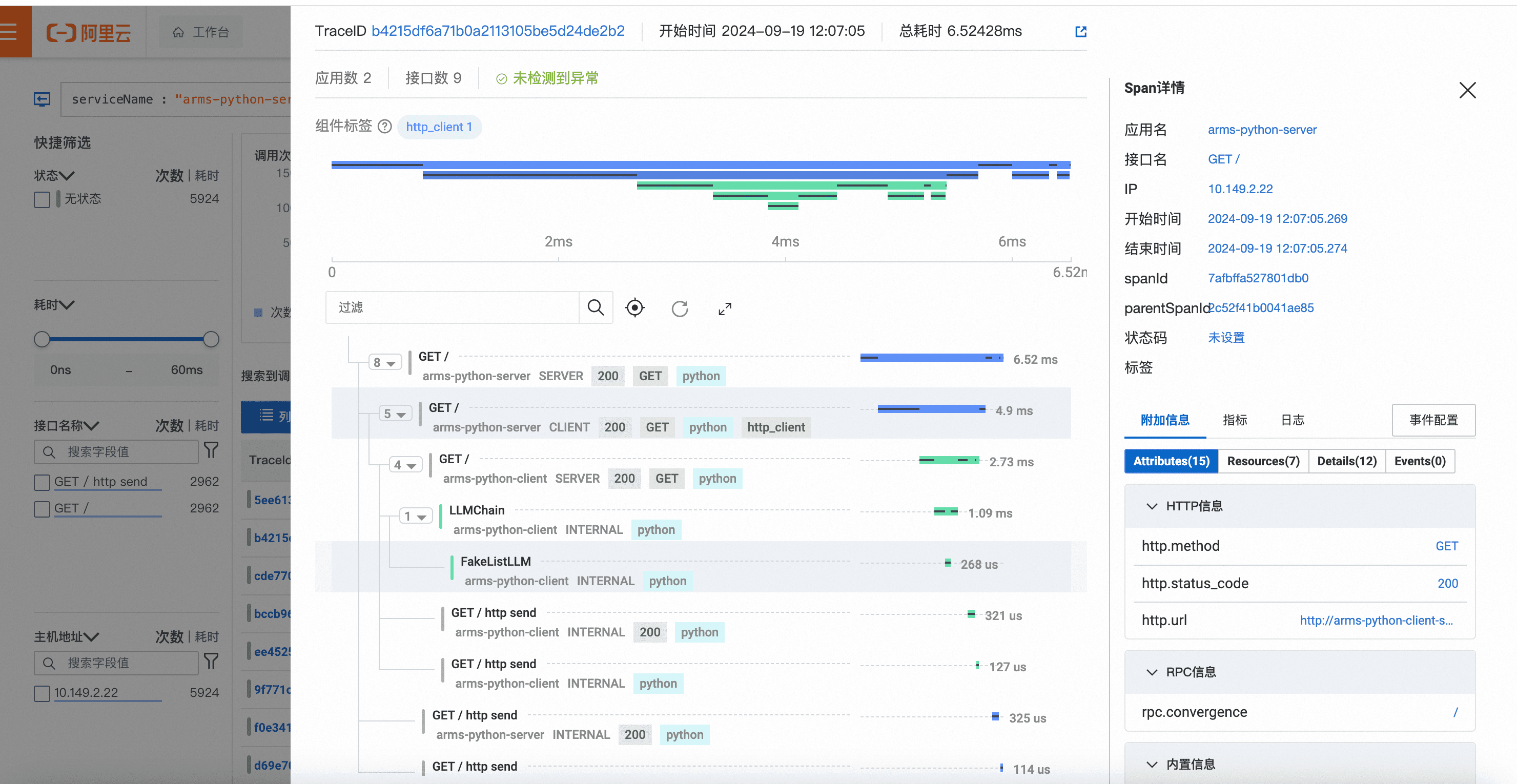
- 大模型场景
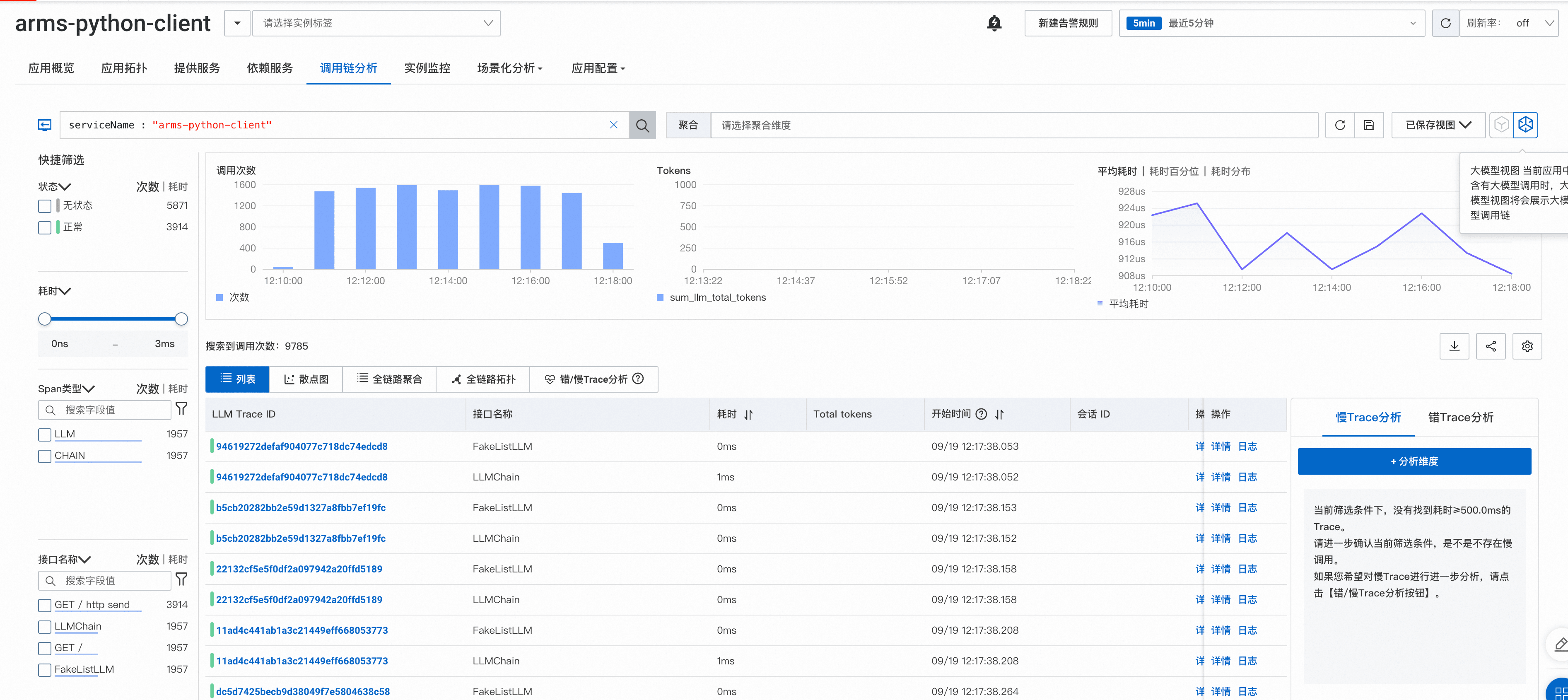
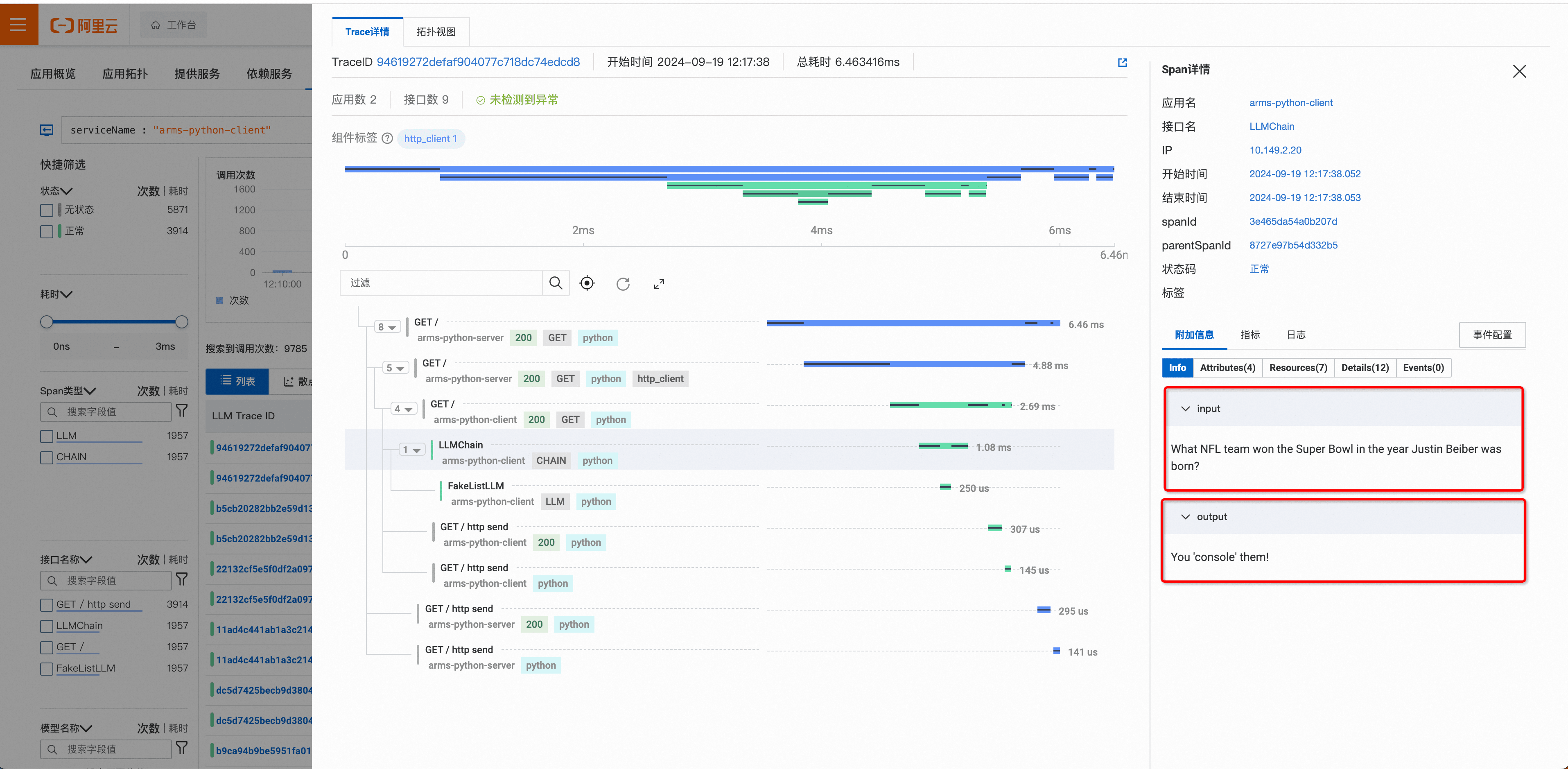
针对大模型场景,您可以查看LLM领域的新版TraceView,更直观地分析不同操作类型的输入输出、Token消耗等信息
首先切换为大模型视图:
具体的大模型调用信息:
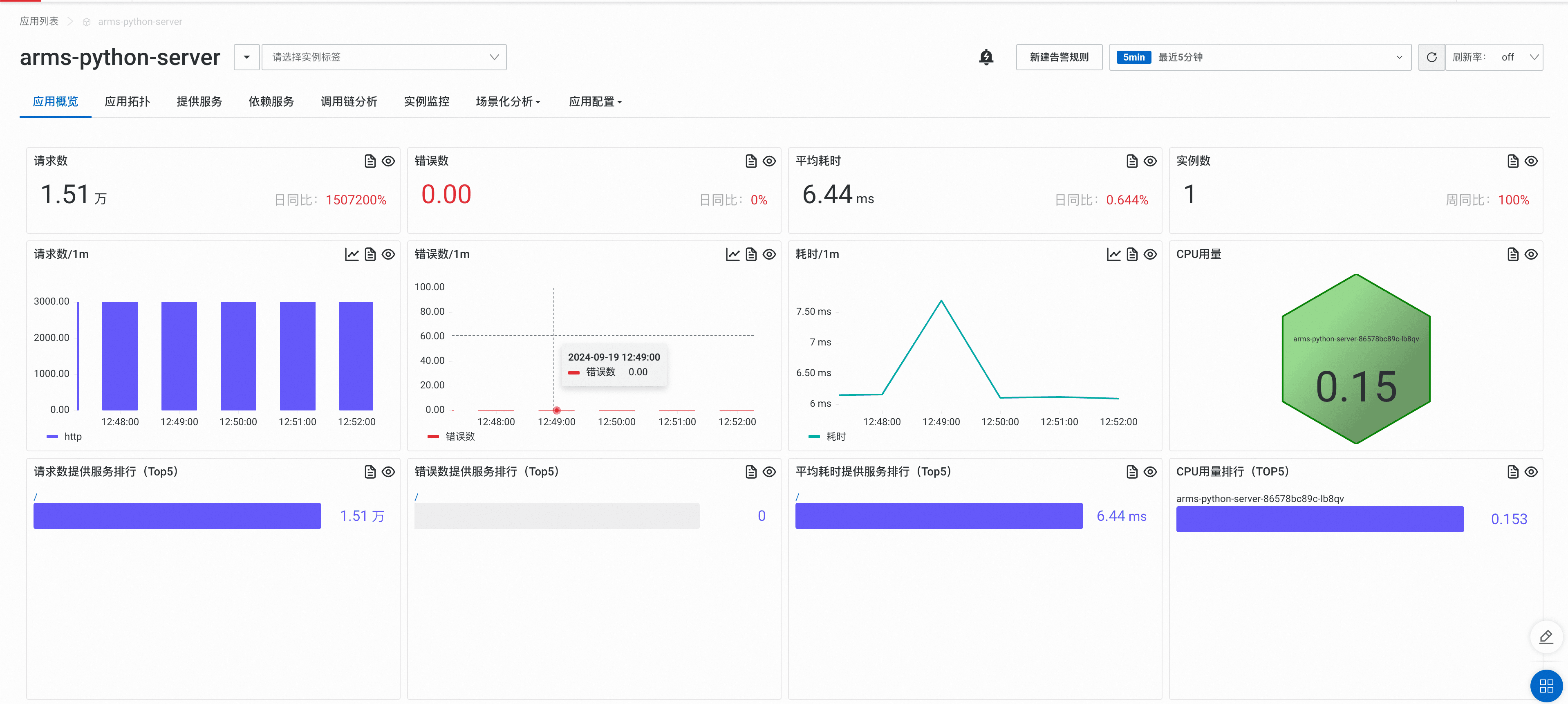
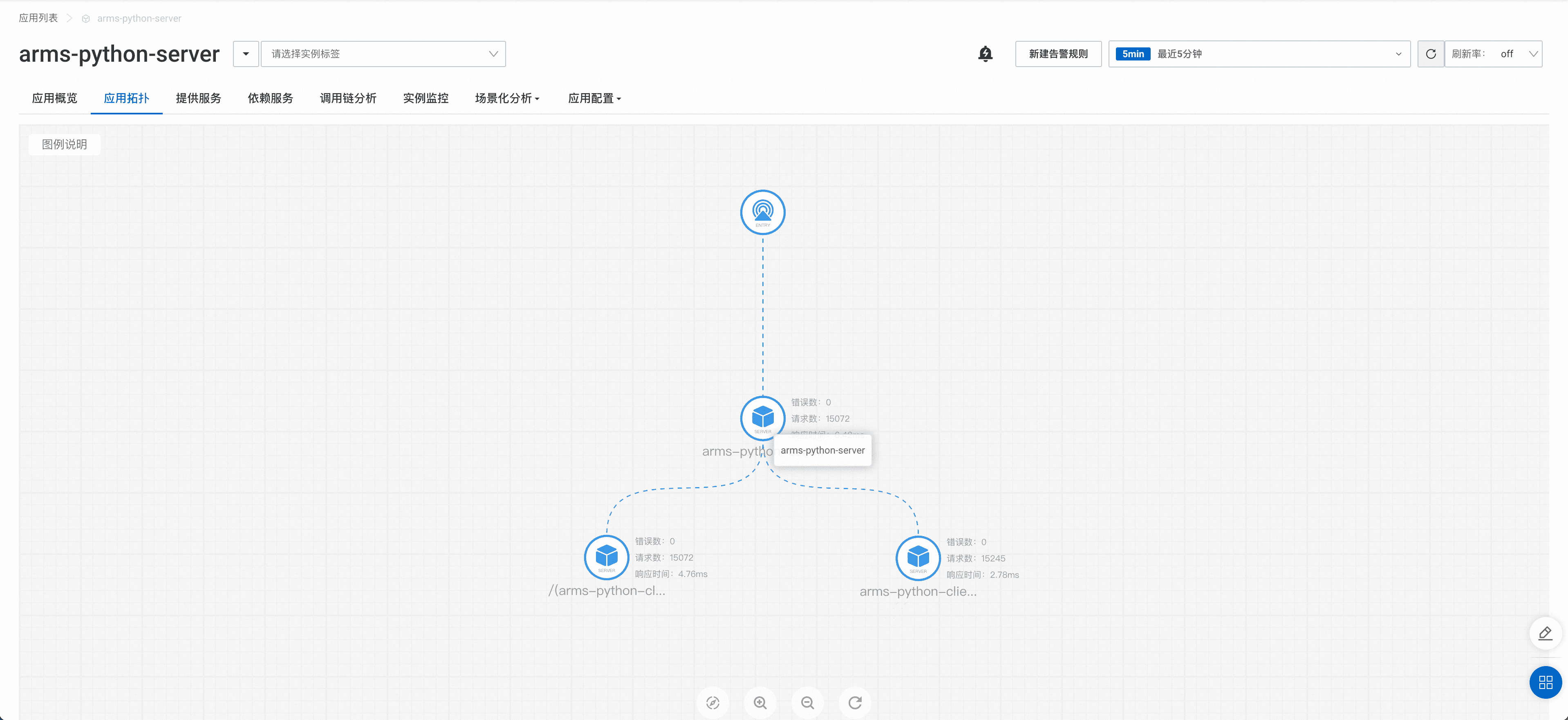
监控指标
- 应用概览
- 应用拓扑
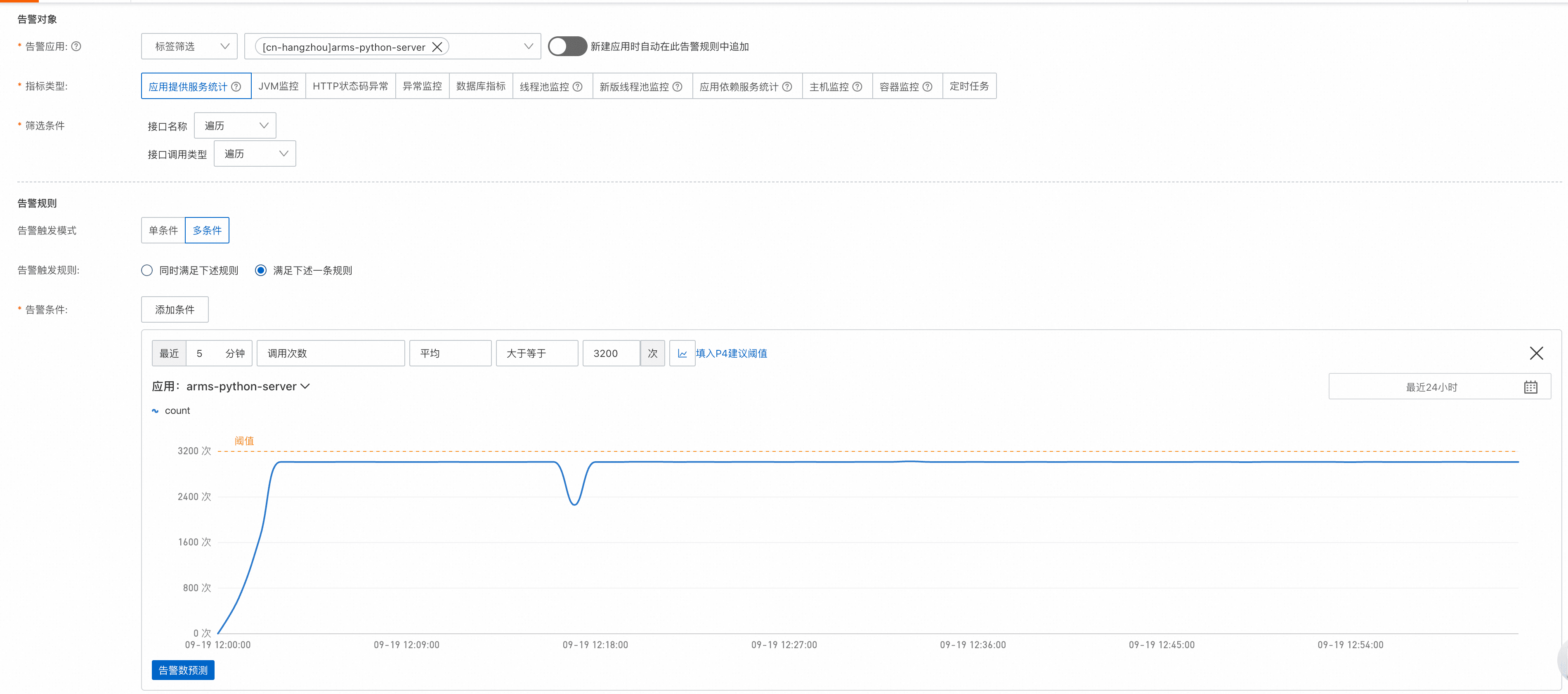
配置告警
通过配置告警,您可以制定针对特定应用的告警规则。当告警规则被触发时,系统会以您指定的通知方式向告警联系人或钉群发送告警信息,以提醒您采取必要的解决措施。具体操作,请参见应用监控告警规则。
兼容性
Python 版本>=3.8
附件
arms-python-server:
import uvicorn
from fastapi import FastAPI, HTTPException
from logging import getLogger
from concurrent import futures
from opentelemetry import trace
tracer = trace.get_tracer(__name__)
_logger = getLogger(__name__)
import requests
import os


def call_requests():
url = 'https://www.aliyun.com' # 替换为你的实际地址
call_url = os.environ.get("CALL_URL")
if call_url is None or call_url == "":
call_url = url
# try:
response = requests.get(call_url)
response.raise_for_status() # 如果请求返回了错误码则抛出异常
print(f"response code: {response.status_code} - {response.text}")


app = FastAPI()


def call_client():
_logger.warning("calling client")
url = 'https://www.aliyun.com' # 替换为你的实际地址
call_url = os.environ.get("CLIENT_URL")
if call_url is None or call_url == "":
call_url = url
response = requests.get(call_url)
# print(f"response code: {response.status_code} - {response.text}")
return response.text


@app.get("/")
async def call():
with tracer.start_as_current_span("parent") as rootSpan:
rootSpan.set_attribute("parent.value", "parent")
with futures.ThreadPoolExecutor(max_workers=2) as executor:
with tracer.start_as_current_span("ThreadPoolExecutorTest") as span:
span.set_attribute("future.value", "ThreadPoolExecutorTest")
future = executor.submit(call_client)
future.result()
# call_client()
return {"data": f"call"}

if __name__ == "__main__":
uvicorn.run(app, host="0.0.0.0", port=8000)
arms-python-client:
from fastapi import FastAPI
from langchain.llms.fake import FakeListLLM
import uvicorn
from langchain.chains import LLMChain
from langchain.prompts import PromptTemplate

app = FastAPI()
llm = FakeListLLM(responses=["I'll callback later.", "You 'console' them!"])

template = """Question: {question}

Answer: Let's think step by step."""

prompt = PromptTemplate(template=template, input_variables=["question"])

llm_chain = LLMChain(prompt=prompt, llm=llm)

question = "What NFL team won the Super Bowl in the year Justin Beiber was born?"

@app.get("/")
def call_langchain():
res = llm_chain.run(question)
return {"data": res}

if __name__ == "__main__":
uvicorn.run(app, host="0.0.0.0", port=8000)
参考链接
- https://help.aliyun.com/zh/arms/application-monitoring/user-guide/start-monitoring-python-applications/?spm=a2c4g.11186623.0.0.24605cecFPVmAp
- https://help.aliyun.com/zh/arms/application-monitoring/developer-reference/python-probe-compatibility-requirements?spm=a2c4g.11186623.0.0.799172cdHe1Dwe
加入钉钉群(群号:35568145)获得在线技术支持。