背景
在日志分析领域,Logtail作为一款广泛使用的日志采集工具,其性能的任何提升都能显著提升整体效率。最近,在对Logtail进行性能测试时,一个有趣的现象引起了我的注意:当启用行首正则表达式处理多行日志时,采集性能出现下降。究竟是什么因素导致了这种现象?接下来,让我们一起探索Logtail多行日志采集性能提升的秘密。
分析
要理解这一现象,首先需了解Logtail在处理多行日志时的工作原理。要理解这一现象,首先需了解Logtail在处理多行日志时的工作原理。Logtail的多行日志合并功能基于特定的日志格式将分散的多行数据聚合为完整事件。其工作流程如下:
- 用户配置行首正则表达式。
- Logtail对每行日志开头应用此正则。
- 若某行不匹配,Logtail继续等待直至找到匹配的行首。
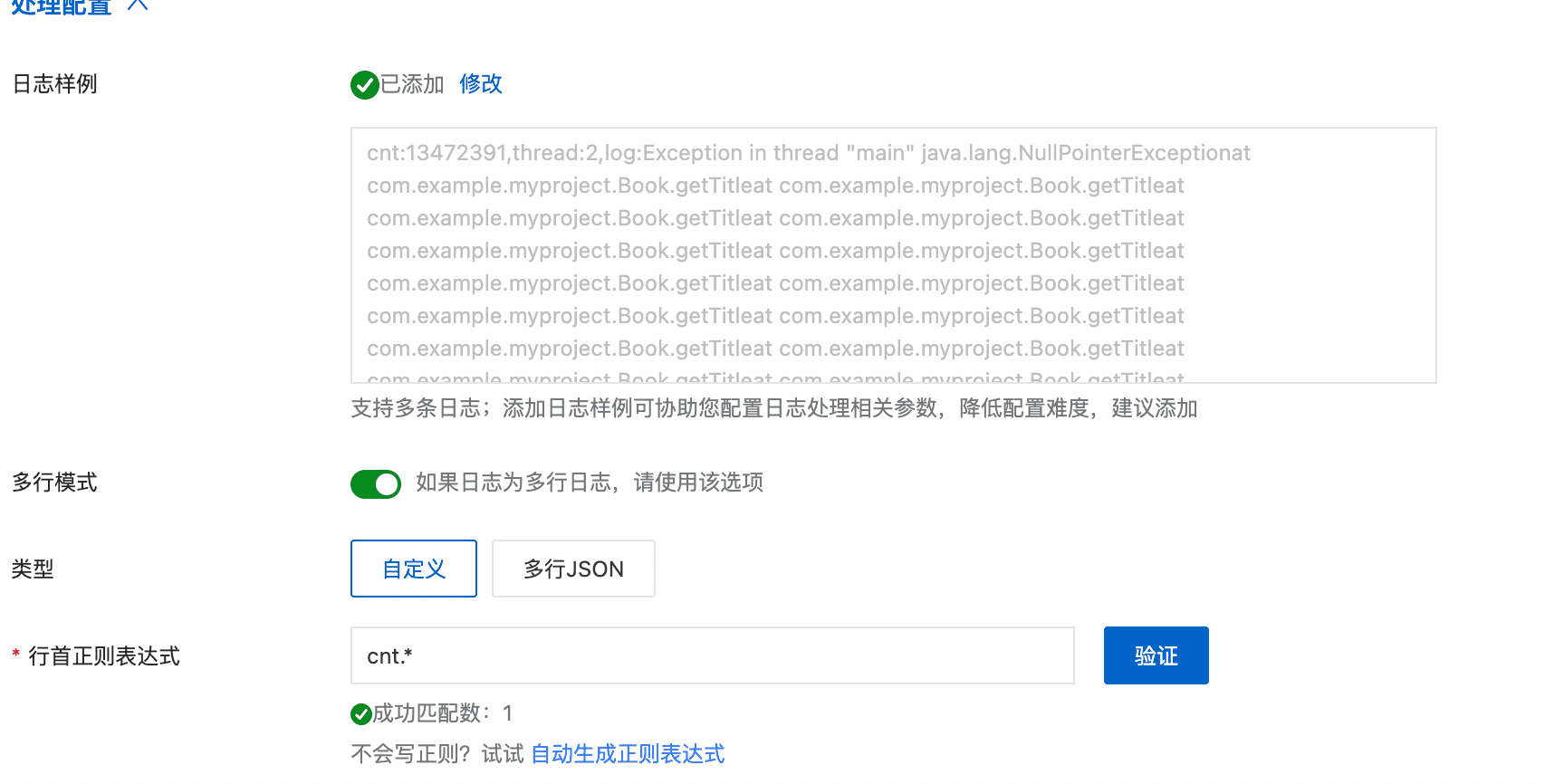
举个例子,假设我们有如下的日志格式,通常我们会配置行首正则为 cnt.*,Logtail会拿着这个正则对每行进行匹配,将这些单行日志合并成一个完整的多行日志。
cnt:13472391,thread:2,log:Exception in thread "main" java.lang.NullPointerExceptionat com.example.myproject.Book.getTitleat com.example.myproject.Book.getTitleat com.example.myproject.Book.getTitleat com.example.myproject.Book.getTitleat com.example.myproject.Book.getTitleat com.example.myproject.Book.getTitleat com.example.myproject.Book.getTitleat com.example.myproject.Book.getTitleat com.example.myproject.Book.getTitleat com.example.myproject.Book.getTitleat com.example.myproject.Book.getTitleat com.example.myproject.Book.getTitleat com.example.myproject.Book.getTitleat com.example.myproject.Book.getTitleat com.example.myproject.Book.getTitleat com.example.myproject.Book.getTitleat com.example.myproject.Book.getTitleat com.example.myproject.Book.getTitleat com.example.myproject.Book.getTitleat com.example.myproject.Book.getTitleat com.example.myproject.Book.getTitleat com.example.myproject.Book.getTitleat com.example.myproject.Book.getTitleat com.example.myproject.Book.getTitleat com.example.myproject.Book.getTitleat com.example.myproject.Book.getTitle
at com.example.myproject.Book.getTitle
at com.example.myproject.Book.getTitle
at com.example.myproject.Book.getTitle
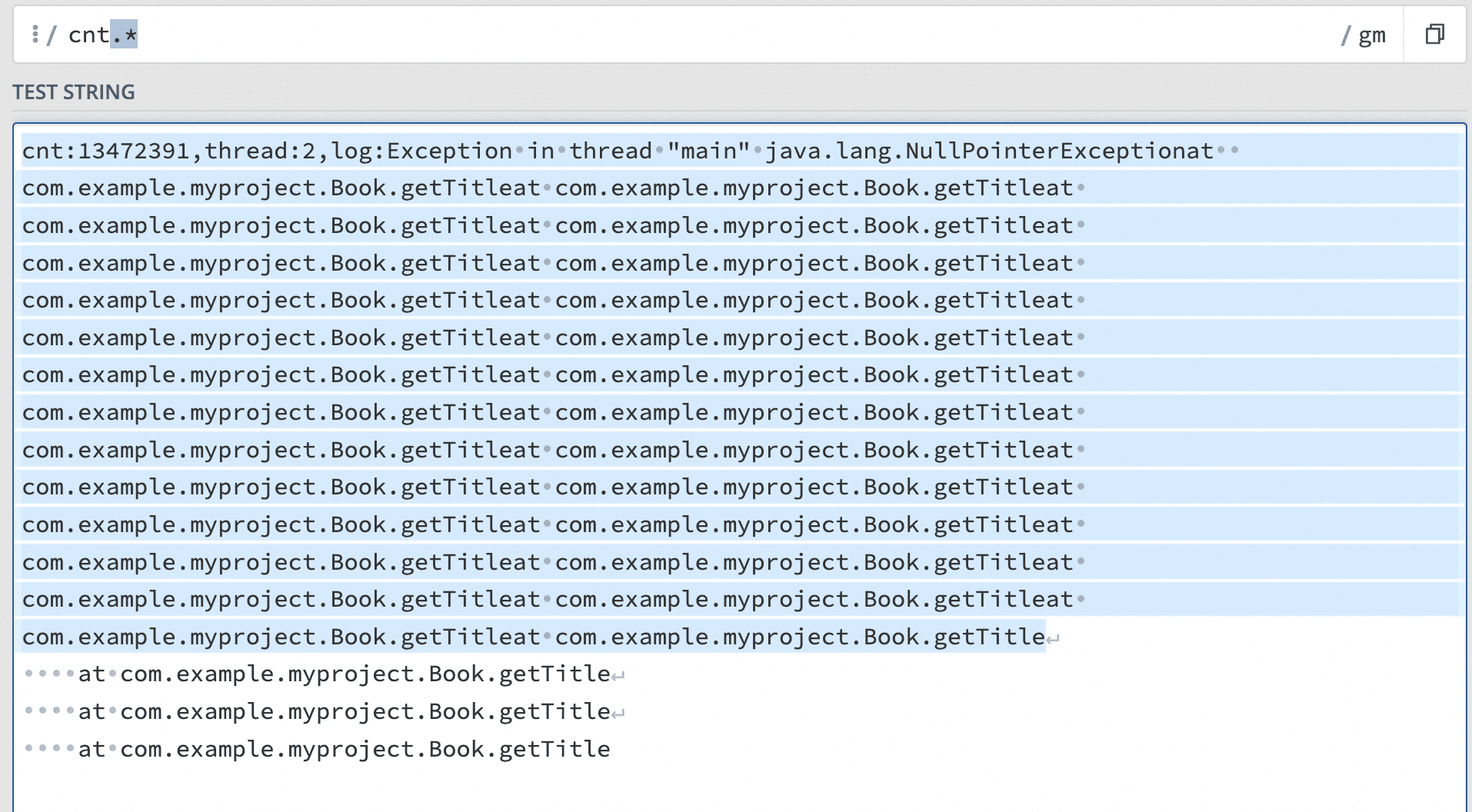
从Logtail的实现机制来看,Logtail使用了boost::regex_match 函数进行的正则匹配。这个正则函数根据输入正则reg,会对输入的日志buffer进行全量匹配。例如上面这个日志,cnt.*会全量匹配第一行的1072个字符。
bool BoostRegexMatch(const char* buffer, size_t size, const boost::regex& reg, string& exception) {
// ...
if (boost::regex_match(buffer, buffer + size, reg))
return true;
// ...
}
我编写了以下测试代码发现,随着与行首正则无关的日志长度变长(.*匹配的那部分日志),boost::regex_match 也线性地增长了。
static void BM_Regex_Match(int batchSize) {
std::string buffer = "cnt:";
std::string regStr = "cnt.*";
boost::regex reg(regStr);
std::ofstream outFile("BM_Regex_Match.txt", std::ios::trunc);
outFile.close();

for (int i = 0; i < 1000; i++) {
std::ofstream outFile("BM_Regex_Match.txt", std::ios::app);
buffer += "a";

int count = 0;
uint64_t durationTime = 0;
for (int i = 0; i < batchSize; i++) {
count++;
uint64_t startTime = GetCurrentTimeInMicroSeconds();
if (!boost::regex_match(buffer, reg)) {
std::cout << "error" << std::endl;
}
durationTime += GetCurrentTimeInMicroSeconds() - startTime;
}
outFile << i << '\t' << "durationTime: " << durationTime << std::endl;
outFile << i << '\t' << "process: " << formatSize(buffer.size() * (uint64_t)count * 1000000 / durationTime)
<< std::endl;
outFile.close();
}
}

int main(int argc, char** argv) {
logtail::Logger::Instance().InitGlobalLoggers();
std::cout << "BM_Regex_Match" << std::endl;
BM_Regex_Match(10000);
return 0;
}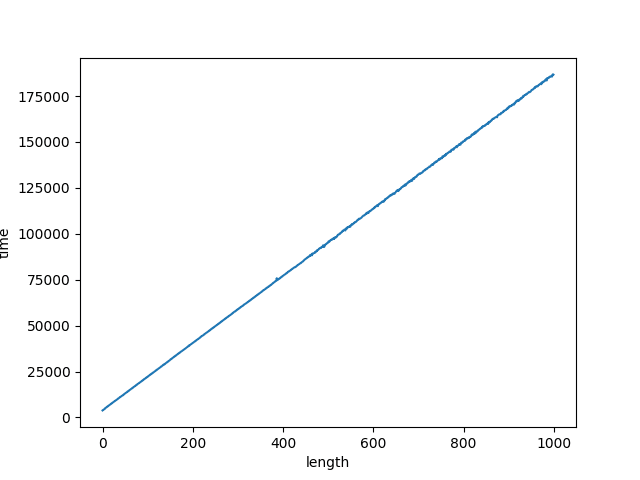
这时候我们就需要注意了,我们使用行首正则时,其实往往只需要匹配单行日志开头的一部分,例如这个日志就是cnt,我们并不需要整个.* 部分,因为匹配这部分会消耗不必要的性能。特别是当日志非常长时,这种影响尤为明显。
其实,boost 库提供了boost::regex_search 函数,只需设置合适的标志(如 boost::match_continuous ),就能实现仅匹配前缀的需求,而这正是行首正则匹配所需求的。我们来看一下如何使用 boost::regex_search :
bool BoostRegexSearch(const char* buffer, size_t size, const boost::regex& reg, string& exception) {
// ...
if (boost::regex_search(buffer, buffer + size, what, reg, boost::match_continuous)) {
return true;
}
// ...
}
在 Logtail 中,由于现有的行首正则实现方式需要,用户的行首正则都带有.*后缀,我们可以自动移除.*并在正则前添加^,以提升匹配效率。
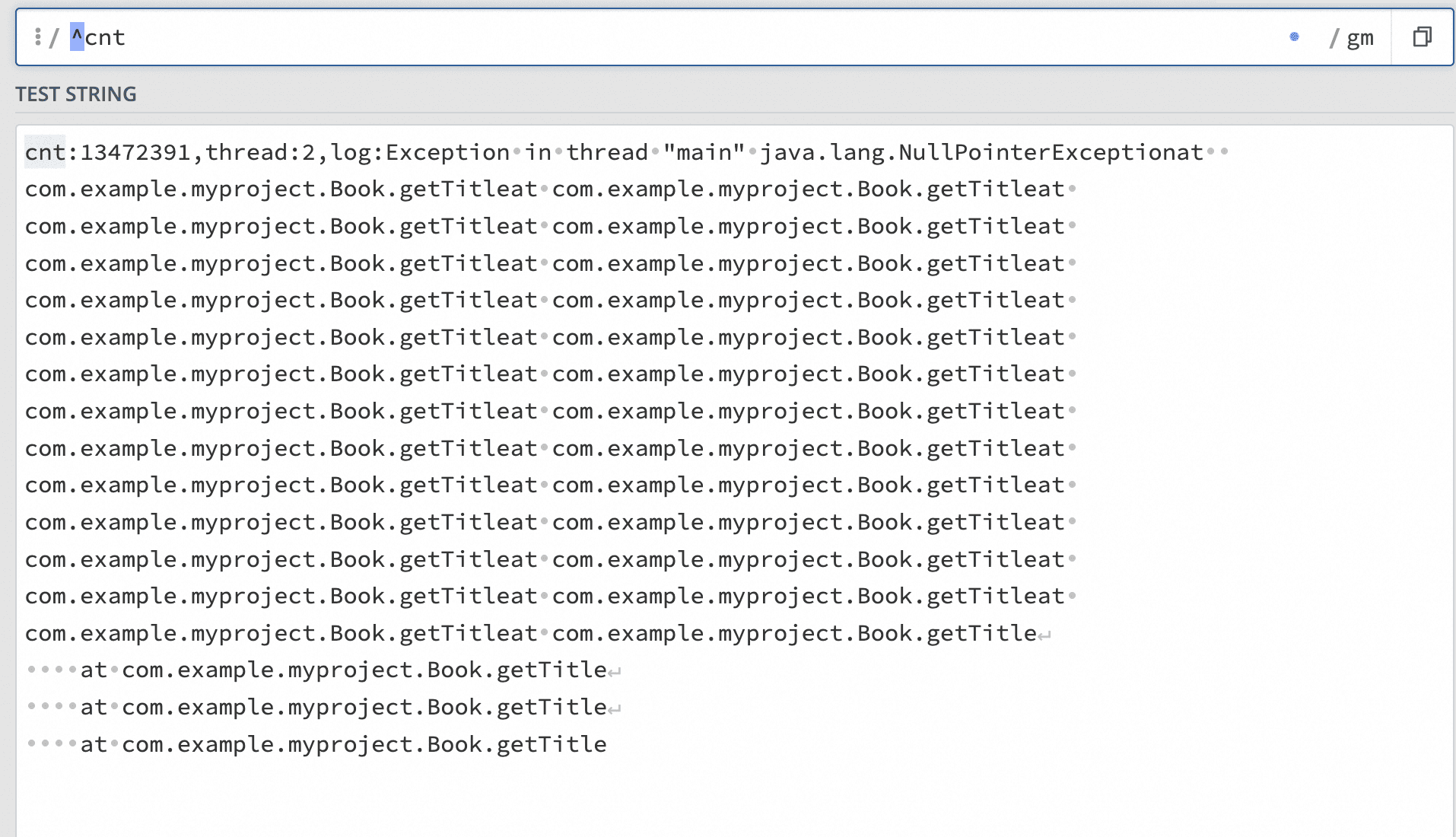
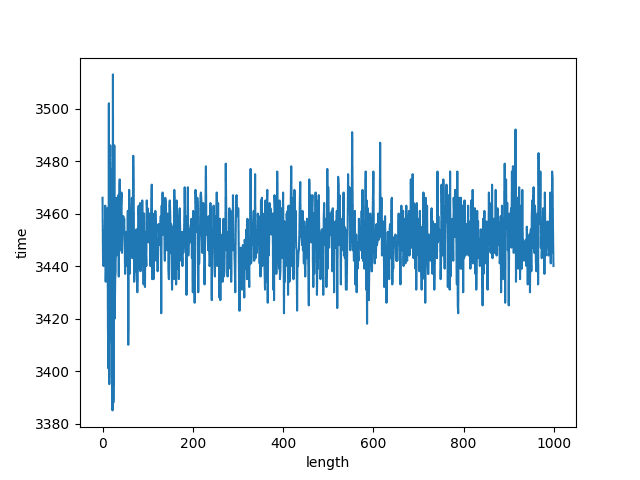
和boost::regex_match 一样,我也对boost::regex_search根据日志长度进行了测试。可以发现,boost::regex_search的耗时基本稳定,没有随着日志变大,耗时变长。
static void BM_Regex_Search(int batchSize) {
std::string buffer = "cnt:";
std::string regStr = "^cnt";
boost::regex reg(regStr);
std::ofstream outFile("BM_Regex_Search.txt", std::ios::trunc);
outFile.close();

for (int i = 0; i < 1000; i++) {
std::ofstream outFile("BM_Regex_Search.txt", std::ios::app);
buffer += "a";

int count = 0;
uint64_t durationTime = 0;
for (int i = 0; i < batchSize; i++) {
count++;
uint64_t startTime = GetCurrentTimeInMicroSeconds();
if (!boost::regex_search(buffer, reg)) {
std::cout << "error" << std::endl;
}
durationTime += GetCurrentTimeInMicroSeconds() - startTime;
}

outFile << i << '\t' << "durationTime: " << durationTime << std::endl;
outFile << i << '\t' << "process: " << formatSize(buffer.size() * (uint64_t)count * 1000000 / durationTime)
<< std::endl;
outFile.close();
}
}

int main(int argc, char** argv) {
std::cout << "BM_Regex_Search" << std::endl;
BM_Regex_Search(10000);
return 0;
}
性能测试
通过这样调整后,我对改进前后的Logtail性能进行了对比测试,测试结果显示性能有显著提升。测试环境如下:
- 相同的ACK集群,相同规格的机器(ecs.c7.4xlarge,16 vCPU,32 GiB,计算型 c7)
- 2048GB ESSD云盘,PL3规格
- Logtail 启动参数保持默认
- 打印日志的程序一致
- 相同的采集配置,只配置行首正则 cnt.*
- 实时生成相同的日志,改日志的特点是行首的长度比较长
cnt:13472391,thread:2,log:Exception in thread "main" java.lang.NullPointerExceptionat com.example.myproject.Book.getTitleat com.example.myproject.Book.getTitleat com.example.myproject.Book.getTitleat com.example.myproject.Book.getTitleat com.example.myproject.Book.getTitleat com.example.myproject.Book.getTitleat com.example.myproject.Book.getTitleat com.example.myproject.Book.getTitleat com.example.myproject.Book.getTitleat com.example.myproject.Book.getTitleat com.example.myproject.Book.getTitleat com.example.myproject.Book.getTitleat com.example.myproject.Book.getTitleat com.example.myproject.Book.getTitleat com.example.myproject.Book.getTitleat com.example.myproject.Book.getTitleat com.example.myproject.Book.getTitleat com.example.myproject.Book.getTitleat com.example.myproject.Book.getTitleat com.example.myproject.Book.getTitleat com.example.myproject.Book.getTitleat com.example.myproject.Book.getTitleat com.example.myproject.Book.getTitleat com.example.myproject.Book.getTitleat com.example.myproject.Book.getTitleat com.example.myproject.Book.getTitle
at com.example.myproject.Book.getTitle
at com.example.myproject.Book.getTitle
at com.example.myproject.Book.getTitle- 首次采集大小10485760,启动参数修改"max_fix_pos_bytes" : 10485760,防止首次读时,日志已经写入了很多。
- 同时运行8个pod输出日志到本地文件
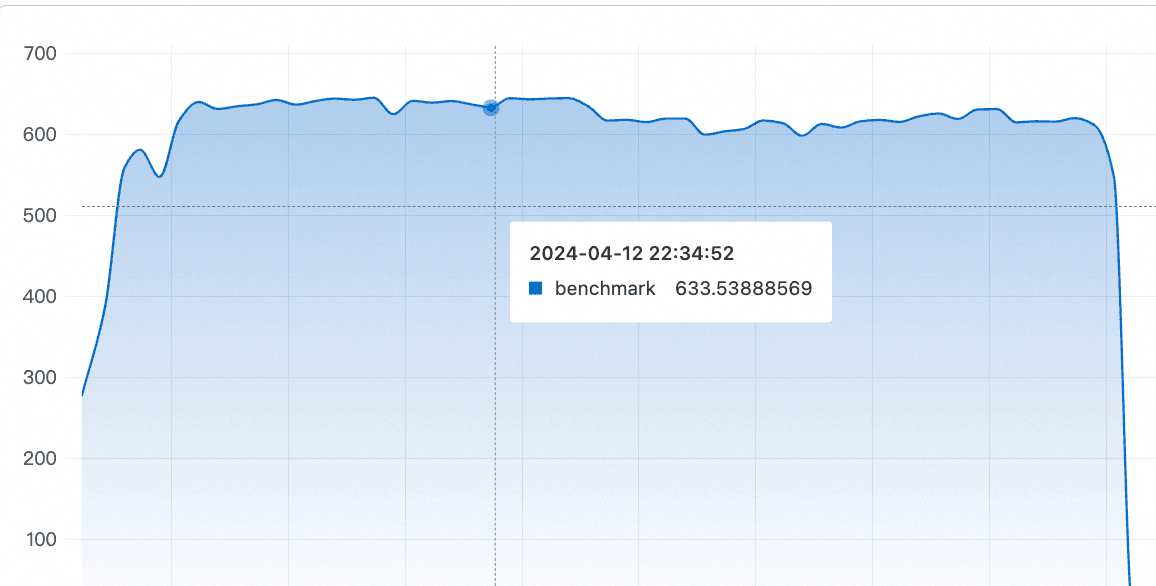
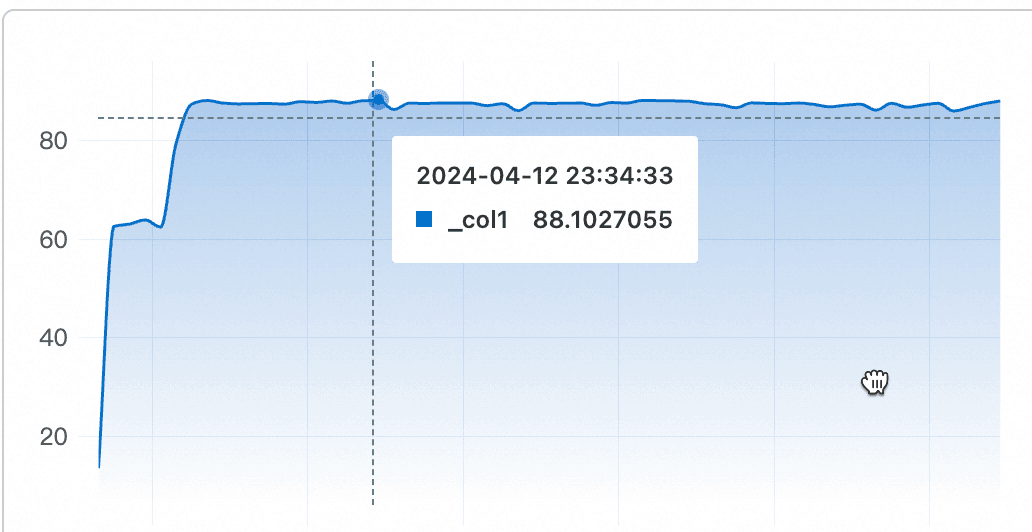
测试发现,优化后的Logtail 2.1.1 版本 日志采集速度达到了每秒633MB/s,而Logtail 1.8.7版本,也就是行首正则优化前的日志每秒处理速率只有90M/s不到,提升了7倍。
| 指标 | 原始情况 | 多行优化后 |
| iLogtail采集速率(MB/s) | 90MB/s | 633MB/s |
总结
我们观察到,当日志内容非常长时,仅通过简单的一行代码修改,就能使Logtail的采集性能显著提升数倍。理论上讲,对于那些与行首正则表达式无关的日志部分越长,这种优化带来的性能提升效果就越为明显。